Breath check-ins for recovery coaches
Breath tests between sessions, on the record.
Your client records one short video from their phone. You watch it and make the call.
Daylight: your coach requested a check-in. Due today at 4:00 PM.
Messages · nowThe text says nothing else. No name, no reading, and no word “test” on a lock screen.
$50 a month per coach, plus $25 per client for breath tests.
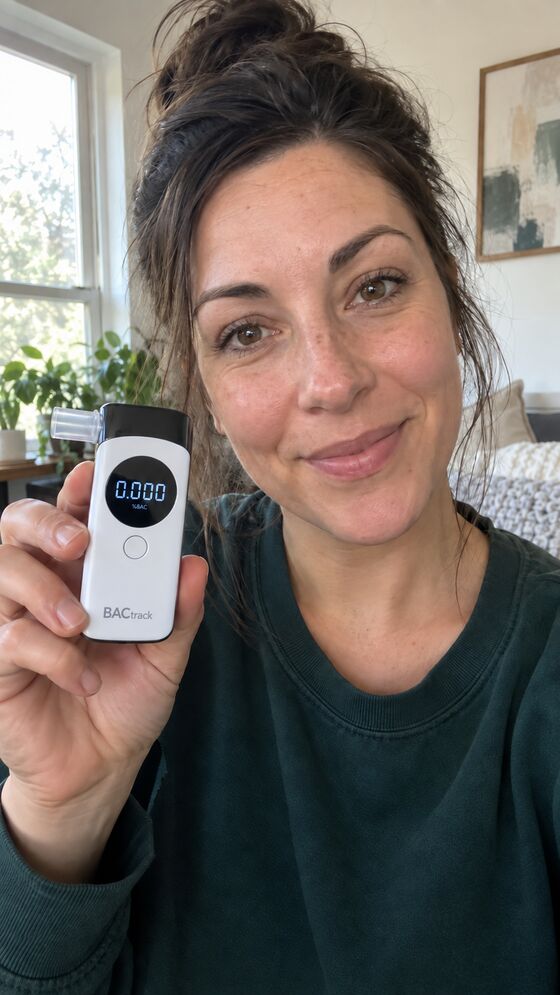
- Spoken words, issued 07:51
- harbor · quilt · seventeen
- Reading on the device
- 0.000 %BAC
- Device
- BACtrack C8, standalone mode
- 0:04Words heard: harbor, quilt, seventeen. Face visible.
- 0:19Breath sample. Device in frame.
- 0:41Final screen readable: 0.000.
- —Editing check: no indicators detected.
Example data. Not a real client.
Nothing to hide, nothing to prove.
A check-in is an agreement between two people. The client shows up on camera; the coach makes a fair call and writes it down. Start with the page that fits you.
How a check-in works
About two minutes for the client. Nothing to install.
A request goes out
You press Send test now, or a schedule fires. Your client gets a text with a due time and a link that expires.
Fresh words
Opening the link gives the client three random words to say. They prove the video was made after the request.
One video
In one take, the client says the words, blows, and shows the final reading. They can also reply to the text with a video.
You decide
Daylight keeps the original, notes what it saw and when, and waits. Nothing is cleared until you clear it.
The hard ones are why you need a record.
A clean 0.000 is easy. The check-in that matters is the one with glare on the screen, a device half out of frame, or a video sent forty minutes late.
Daylight keeps three things apart: the reading the device showed, what the video model observed and when, and your decision with your note. Corrections become new versions. A later reader can see exactly where a conclusion came from.
- Spoken words, issued 19:20
- meadow · copper · forty-one
- Reading on the device
- Not readable
- Device
- Glare across the display at 0:38
- 0:03Words heard. Face visible.
- 0:17Breath sample. Device partly out of frame.
- 0:38Final screen not readable.
- —Editing check: no indicators detected.
Coach note: “Screen unreadable. Retest requested for tonight with fresh words.”
Example data. Not a real client.
One price for you, a small one per client.
You pay $50 a month for your workspace: scheduling, messaging, drug-screen recording, and review. Each client on breath tests adds $25 a month, with 125 reviewed check-ins included.
Your clients use a breathalyzer they already own, or one you recommend. Any breathalyzer with a screen works; the BACtrack C8 is read automatically.
$150 a month
For one coach on Daylight. Breathalyzers are separate.
- Coach plan$50
- Breath tests, 4 × $25$100
The same clients elsewhere, per month
BACtrack View at its lowest plan ($79.99, device included). Soberlink at its lowest plan ($135) plus its lowest device fee ($19). From their pricing pages, October 30, 2026.
Every test can leave the building.
Open any test and export its record package: the original video, byte for byte, a printable summary, every decision version, the AI observations, the timeline, and a checksum file to show nothing changed.
That's the file a family, a program, or an attorney will ask for.
- Who sees the video
- The coach who enrolled the client. There's no shared or team access. Core Values Recovery's administrator can view records read-only, and every view is logged.
- Where the video goes
- Private storage under the coach's account. A copy goes to Google's Gemini for observations, and Daylight asks for it to be deleted afterward.
- What it doesn't claim
- It's a working pilot. It isn't clinically validated, isn't covered by HIPAA, and doesn't replace lab or court-ordered testing. Every limit, in plain words
Who's behind Daylight
Daylight is built and run by Core Values Recovery, LLC, a recovery coaching company. Its coaches have used it with their own clients since September 2026. Questions go to a person: support@corevaluesrecovery.com.
Start with one client.
Create an account, add a client, and walk through the first check-in together on a call. The guided setup never sends a message you haven’t seen.